Increased efficiency and reduced waiting times through smart
Queue management
Logis.P Queue management provides the end-to-end solution to optimise the entire process flow. Both as part of an integrated Patient Flow Management process, or applied as a specific call-in and queue management system for e.g. blood collection lab, radiology, pharmacy, patient registration desk or outpatient clinic.
Wondering if Logis.P queue management also offers the solution for your challenges? Request free tailor-made consultation with our specialists.

The process of queue management




Digital referral & online scheduling
When deploying the Logis.P Queue management solution, the option -in addition to the 'walk-in' process- is open to deploy an easy to use scheduling solution (Logis.P SmartAppointment). It enables patients to easily book (blood collection) appointments online via the internet. Through the optional integration with the digital referral solution from ZorgDomein, it enables that relevant data can be used and pre-filled to ensure maximum ease of use for patients/clients when scheduling an appointment. After booking the appointment, patients receive an appointment confirmation, that contains a QR-code via e-mail or smartphone (Smart Visit). The QR-code can be used to easily check-in at the kiosk upon arrival . Also if an existing external -third party- appointment scheduling application is used (for example Serviceware), than it is also possible to integrate it with the Logis.P Queue management and call-in application. This enables the recognision of these appointments when patients check-in on site.
Selfservice at check-in kiosk
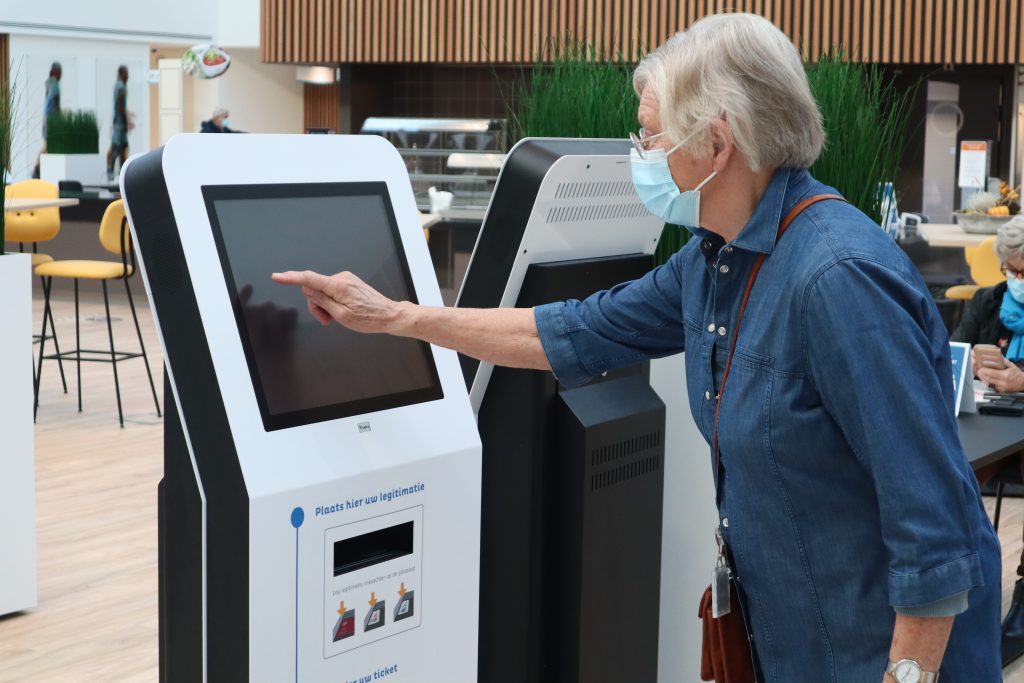
The check-in process consists of the following steps, in which the desired scenarios and way of working can be determined and varied: Patients or clients check-in at the selfservice kiosk independently. Through a selection menu patients can state if they already have a QR code or dayticket ..
If the patient has made an appointment through the on-line appointment booking system in advance and has received the QR-code, it can easily be scanned at the at the kiosk. The kiosk can also be equipped with an ID document reader, enabling that
(the chip or MRZ of) passports, ID-cards and drivers licenses can be read.

Depending on the desired integrations and data provided from from the Hospital, Laboratory or Radiology Information System, the patient number can be retrieved on basis of the social security number (BSN). Corresponding appointments and/or orders for the patients are recognised immediately. In addition, it is also possible to perform several patient data checks at the kiosk (including WID check and address data by means of a query at SBV-Z, as well as a check of current insurance data at VECOZO). When there is a free walk-in (or the patient has not made an appointment in advance), the patient or client can select the purpose of their visit via an easy drop-down menu presented at the kiosk.
When relevant data is missing, or information about the patients appointment and/or order is missing, the kiosk can display a notification. This may result in the patient being routed to the front desk before being called to the puncture cabin. If working without a front desk counter (counter-less working) these exceptions can be called to a specific cabin where a senior staff member works that can handle the exceptions centrally. The kiosk prints a ticket provided with a call-in number (for the cabin or the counter). It also displays the instruction where -or in which waiting area- the patient can take a seat.

Queue management and information
Based on the scanned QR code or the selection the patient has made on the kiosk screen, the patient or customer is placed in a specific queue. This queue classification can be organisation-specific, where the prioritisation per queue can also be set. If order integration is being used, the Logis.P system recognises the patient checking in at the kiosk, and the patient is automatically placed in the correct queue based on the open order(s) within the date range. This is not only convenient for the patient, it also prevents patients from “abusing” it by -falsely- selecting an urgent option such as CITO, hoping to get their turn earlier.
To support the call-in functionality, information-/call-in displays are installed in the waiting area(s). Patients can see the expected waiting time for the different queues (in case of free walk-in). The screen also displays the call number -if desired in combination with a
acoustic signal- when it is the patient's turn. This also shows which counter or blood collection cabin the patient can go to (depending on the chosen set-up/configuration). The displays can be used to only show call numbers and waiting times, but it is also possible to use the screens as a source of other information such as informative videos, news reports, weather and traffic information, etc. Logis.P offers its own narrowcasting system for this purpose, but the call system can also be integrated into existing narrowcasting systems from third parties/external vendors.
Flexibility is also offered for use and supply of hardware. Through the audiovisual division of Logis.P (Promed AV), all necessary hardware can be supplied and installed to ensure maximum peace of mind. If your organisation already has good call-in displays on site; no problem either; the Logis.P software will then be installed on the existing displays/players.
Dynamic call-in & monitoring of KPIs
After successful check-in at the kiosk, both front-desk staff and employees in the blood collection cabins have insight into the patients that have registered. To call-in a patient, the staff member presses the “call next” button and the algorithm in the Logis.P application determines which patient will be called based on the set rules. It is also possible to “manually” call in the next patient from the list of patients that are present (e.g. based on the blood collection appointment bookings made in advance).
For maximum easy-of-use, the Logis.P call-in functionality can also be integrated in the source applications (e.g. EHR, EPJ, Laboratory Information system or blood collection system). This enables employees to work from a single application without having to shift between the call-in application and their core- or source system. Based on the profile with which an employee is logged on to the application, the user thereby gets only those patients in his or her queue, that match the profile (competencies) for which the user is trained or authorized. Also a system setting can be made that determines if the 'next patient' may be hand-picked from the list (often reffered to as 'cherry-picking'), or that upon selecting "call next" the algorithm in the application determines who is next in line for the employees in the cabin.
Guarding whether set standards -such as maximum waiting times- are not exceeded is also a standard functionality of the system. The “Live Management Information” function provides the monitoring function to detect and warn if defined standards/KPIs are in danger of being exceeded (e.g. longer waiting times for certain queues than set within the standard). The system generates alerts to managers on which appropriate actions need to be taken.

Continue visit or departure from location
A visit to the lab, radiology department or pharmacy can be a stand-alone appointment. In that case, after the appointment is completed, a patient or client goes home. If there are combination- or multiple appointments within the hospital or facility, the Logis.P Patient Flow Management system offers additional added value. Because the same day ticket can be used for all other appointments. Even if there are large crowds at blood collection, the system can recognise whether a patient has follow-up appointments in the hospital. Prioritisation can be dynamically adjusted accordingly and a patient with follow-up appointments is given ‘priority’ over a patient who only comes in for blood sampling without other appointments. If a patient in the hospital also has to collect medication from the pharmacy, the Logis.P platform that provides patient identification is benficial. Due to patient identification at the time of registration, it is immediately known which patient is registering at the lab, radiology department or pharmacy. This increases both patient safety and production/efficiency in the process.
PowerBI reporting & Live management
In addition to the Live Management Information function available, the Logis.P Queue management system also provides additional management information. It delivers detailed data that provides targeted insight and information for steering of an optimized queue management process. The reports are included in the application via (embedded) Microsoft Power BI. Depending on the configuration of the system, the application provides targeted management information on the generic process (e.g. total numbers per period/location, utilisation of available capacity, average waiting times per
location/queue type). In addition, specific information on key figures and production per employee is also available. The overviews can be used ready-to-use from within the system, without requiring knowledge of Power BI. If the data needs to be included in an organisation-wide corporate data warehouse or BI environment, the data can also be easily exported. The manigement information is indispensable to see where improvements can be made, or to benchmark performance between locations.

Why choose Logis.P Queue management?
An efficient queue management process not only ensures reduced waiting times, but also offers patients clearer information and a more positive patient experience. Directly upon check-in with an ID-document several checks are being executed, such as insurance (Vecozo), patient details (SBV-Z) and validity of the ID document (WID-check).This ensures a flawless patient registration and saves re-work or bottlenecks further in the process. Logis.P also offers additional tooling such as CassControl ; an effective solution that can be used in the administrative/financial department to make the claims process more efficient and save time in correcting declined health insurance claims.
When deploying queue management as part of integral Patient Flow Management the priority of patients waiting can be adjusted dynamically. This enables patients that have follow-up (doctors)appointments in the hospital, to get prioritized over patients that do not have follow-up appointments. This offers an improved patient journey and help prevent doctors waiting for their patients to show up. Due to the possibility to call-in the next patient directly from the cabin, the system also supports working without-counters' in an efficient way. The Logis.P application is flexible in it's set-up, also to support external or outsourced laboratories in the hospital.
Naturally, the Logis.P queue management solution meets the highest standards of information security and privacy, as evidenced by the ISO27001- and NEN7510-certification..
Features Logis.P Queue management
With the deployment of Logis.P Queue Management, the process from registration/check-in to call-in al the cabins is optimally supported. By using Logis.P Best-practice implmentation methodology, Logis.P specialists can ensure that the system is up and running at lightning speed. Discover the features:
- Optimal queue management suitable for hybrid situations; possible to combine free 'walk-in' with 'upon appointment'
- Easily and flexibly configurable queues with specific prioritisation and monitoring of max. waiting time standards
- Registration/check-in can be facilitated in multiple ways; both with- and without ID check
- Comprehensive reporting and monitoring creates transparency in processes and offers steering information
- Can be combined with multiple appointment scheduling and source systems via integration API and/or HL7

Proof of added value in practice
30-40% efficiency increase at Leiden University Medical Center
Leiden University Medical Centre's (LUMC) Central Blood Collection Lab saw logistical efficiency increase by as much as 30 to 40 percent.How come? Through smart software solutions from Logis.P that ensure streamlined patient flow, direct order checking upon check-in at the kiosk and smart, automatic queue distribution. The project has been awarded the Clinical Chemistry 2022 audience award of the NVKC (Dutch scientific professional association of clinical chemists).
Patients are helped in less than 7 minutes
Instead of long queues, peak traffic and mis-registrations, patients are now helped in less than 7.5 minutes. Thanks to automated processes and smart links to the EHR system (Chipsoft HiX), patients are efficiently guided to the right blood puncture cabin from entry. Error margins have been minimised, waiting times halved and the utilisation of blood puncture cabins increased to almost 100% productive utilisation.

Key benefits of queue management for LUMC
- Fully automated order check before blood collection
- No unnecessary waiting times or patients in incorrect queues
- Administrative errors are caught on entry, enabling more productivy in blood puncture cabins
- Employees can fully focus on their core task
- Increased patient experience and higher employee satisfaction
"Thanks to the smart algorithm in the queue management software of the kiosk and the order checks, everything happens flawlessly and efficiently. Not only the employees notice this and benefit, but especially the patients." - Arjan Albersen, LUMC
Intelligent integration of software and processes
Through Intelligent integration of software and processes the entire patient flow logistic is optimised - without compromising the walk-in principle of blood collection at LUMC. Logis.P thus proves that queue management goes far beyond mere planning: it is about creating calm, overview and space for care.
Logis.P offers flexible and seemless integration with, among others:
 More information
Would you like to find out more about how our solutions work and what their functionalities can do for your organisation? Please submit your details, and one of our professionals will contact you as soon as possible.